Lesson 6: Accessibility Data Quality
What is it?
In data quality, accessibility is the extent to which data are available and how easily the user can access them. This dimension emphasizes the role of computer systems in overall data quality, including the following:
- The extent to which data are available or easily and quickly retrievable (accessibility)
- The extent to which data can be restricted and kept secure (access security)
While technical aspects like computing resources and network reliability are key components of data accessibility, so is a user’s ability to interact with the data to meet their needs. This can include having standard protocols for requesting data, ensuring that data users have appropriate permissions in data systems, and providing tools for users to query or summarize data. Data accessibility also involves maintaining the privacy of the people whose information is recorded in the data and is often subject to rules and regulations regarding this privacy.
Data with high accessibility quality must balance allowing authorized users to interact with data to meet their needs with preventing unauthorized individuals from accessing or manipulating the data. For example, you could increase the security of a dataset by preventing any user from accessing it, but it would no longer be accessible to people who need it. Alternatively, you could make your data more accessible by not requiring passwords for user accounts, but it would be much less secure. You must find a middle ground.
Why is it important?
- You must be able to access data to draw any conclusions from it.
- In corrections, different types of people use data—operations staff, data analysts, department leadership, and in some cases even external stakeholders—and they all need to access it in ways they can use it best.
- Data that is difficult to access or manipulate can limit analysis and cause delays in reporting.
- Departments of corrections (DOCs) need to control and monitor access to their data to meet security regulations and requirements.
- Corrections data can contain sensitive or personally identifiable information about individuals that needs to be handled carefully, such as medical diagnoses, criminal histories, and social security numbers.
- Unauthorized access to data can compromise its integrity and reduce people’s trust in the data and any analysis of it.
Accessibility data quality can also affect other dimensions of data quality—for example, data that is accurate and reliable (high intrinsic quality) may still be considered to have poor overall quality if users cannot access it. Similarly, the other dimensions of data quality impact accessibility—for example, users may not consider data accessible if it’s in a format they can’t interpret (low representational data quality).1 As stated in previous lessons, this overlap makes it important to assess and maintain data quality across all four dimensions.
As with representational data quality, accessibility issues arise when the technical aspects of information systems do not align with the needs of the people who use them. For example, imagine a scenario where you are an analyst at the DOC tasked with creating a monthly report on parole supervision officer caseloads. The DOC records parole supervision information in the CorrDat data system, which is managed by the vendor BigDataCo. To get the necessary data out of CorrDat, you must submit a request to BigDataCo, who can take up to three weeks to process each request. This delay would prevent you from meeting DOC leadership’s desired timeline for these reports. To ensure that you can generate the reports on time each month, you work with BigDataCo to establish an automated monthly delivery of the data needed from CorrDat.
Key questions
Assessing the accessibility of data requires understanding how data is recorded, stored, managed, viewed, and retrieved. It also requires understanding who needs to access data, how much access they need, and what protections are necessary to prevent unauthorized access.
Because each data user can have different access needs, the perception of data accessibility may differ across users and roles. Therefore, it can be beneficial to get input from front-end system users (e.g., people who input data, people who view data) about their ability to interact with the systems and data. If your system is undergoing a case management system transition, make sure to understand how the new system will impact data storage and accessibility.
Because this dimension involves technical aspects of information management systems, assessing the accessibility of your data may also require input from system vendors (if applicable), database administrators, and/or IT department staff about how these systems operate and how access is granted to users.
Consider the following questions when assessing the policies and practices that impact data accessibility at your agency:
- Is data recorded in a centralized case management system?
- Is data managed by an internal (in-house) or external (contracted) team?
- How long does it take for a new user to gain access to a data system or collection?
- How easily can users access and retrieve data within their systems?
- Is data access enabled by user-friendly interfaces?
- Do users receive training on how to use the data system(s)?
- Are data users able to create reports or query/pull data from the database?
- Is there a mechanism for sharing data with other agencies and partners?
- Are access control mechanisms in place (e.g., authentication) to ensure that only authorized users can access the data?
- Is the dataset stored and transmitted using secure and encrypted methods to protect the data from unauthorized access and breaches?
- Are users trained in data security best practices, ensuring that they understand their roles and responsibilities in maintaining data security?
- Is there a data breach response plan to mitigate the impact of any unauthorized access?
- Are users being granted the minimum permission necessary for a user to accomplish an assigned task? Are users being granted too many privileges?
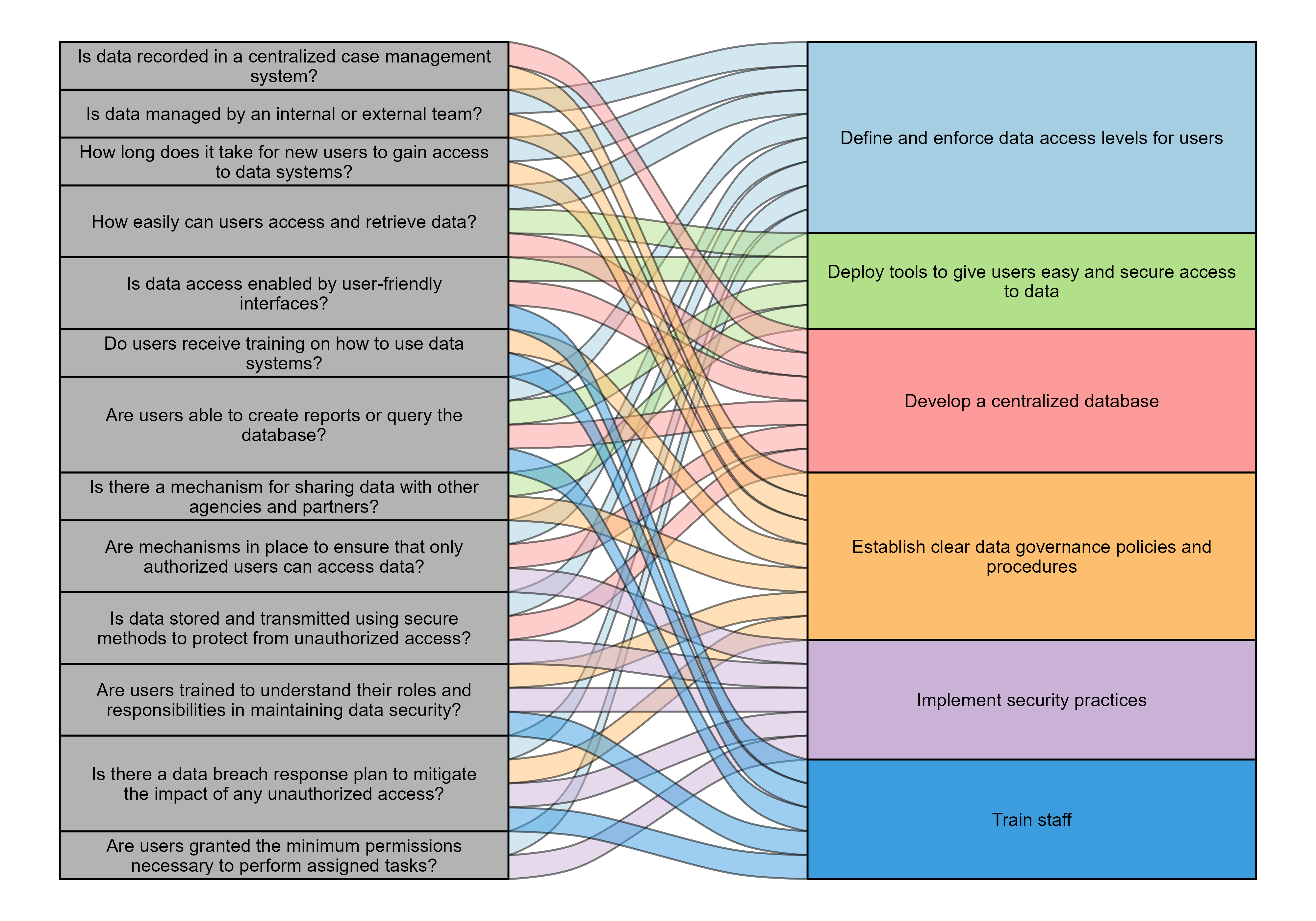
The components of accessibility highlighted in these questions can all be tied to best practices that you (and your agency) can implement to ensure your data is accessible and secure.
Best practices
Data that has high accessibility quality is securely stored, available to users, and has clear policies regarding its use and sharing. Maintaining accessibility is an ongoing process that requires developing and upholding practices that ensure consistently high-quality data.
High accessibility data quality can be maintained through several best practices. Unlike the other dimensions of data quality, these practices involve things that are typically outside of an analyst’s control. Many of these strategies may require policy change or larger discussions within your agency (e.g., data standards and security practices, granting access permissions). However, analysts can still play an important role in assessing and maintaining accessibility data quality by doing the following:
- Providing input about how data is used and any difficulties interacting with it
- Advocating (when feasible) for strategies and solutions based on best practices for maintaining high accessibility data quality
- Maintaining the security of the data files they work with
Define and enforce data access levels for users
Establish access levels based on the roles, responsibilities, and needs of each user. Use the principle of fit-for-use when granting access. In other words, grant the appropriate permission that is necessary for a user to accomplish the tasks associated with their role. For users who need higher levels of access (e.g., to delete or modify data records, to execute system-wide programs), create separate accounts for regular and administrative access to isolate privilege sessions.
Deploy tools to give users easy and secure access to data
Create self-service data access tools, such as graphical interface tools or application programming interfaces (APIs), to allow users access easily and securely. Develop system-generated reports to provide frequently requested information and allow users to submit custom queries to meet their data needs. Limit available tools based on each user’s level of access (e.g., case managers should be able to use different tools or queries than contracted program providers).
Implement security practices
Develop policies and practices designed to ensure that data is secure at the database (protection of the data stored within the database), access (protection of the mechanisms used to access the database), and perimeter (protection of the network connected to a database) layers. Establish a defined data request protocol for accessing data and encrypt all data stored on local devices or transmitted over a network. Protect data in accordance with applicable federally mandated data security requirements, such as the Health Insurance Portability and Accountability Act (HIPAA) that restricts sharing personal medical information, as well as any state or local requirements, such as state laws about accessing and sharing criminal history information.
Additional best practices
Some of the best practices for accessibility data quality are also best practices for intrinsic data quality and were discussed at length in the lesson on that dimension. Below is a brief description of each; refer to Lesson 2 for more information.
- Develop a centralized database. A centralized database with limited levels of access ensures that all data is stored in one place, which is important for data security, and allows analysts to programmatically access key data from across the organization.
- Establish clear data governance policies and procedures. Clear policies that dictate how to maintain the data management infrastructure help ensure that data are managed consistently, transparently, and securely in a controlled environment.
- Train staff. To follow any data governance or data security requirements, staff must know what the requirements are and how they relate to users’ respective roles. Similarly, staff need to know how to use any available data tools to meet their needs.
These best practices are designed to help you and your agency maintain data with high accessibility quality. Upcoming lessons will provide examples of how DOCs have implemented the various best practices for data quality and will build toward assessing your agency’s data quality standards and developing new strategies for ensuring you maintain high-quality data.
Diane M. Strong, Yang W. Lee, and Richard Y. Wang, “Data Quality in Context,” Communications of the ACM 40, no. 5 (1997), https://doi.org/10.1145/253769.253804.↩︎